



TR
Bazı forumların yazılımlarında host dosyalarınız izniniz dışında değiştiriliyor ve kendilerine rakip gördükleri sitelere girmeye çalıştığınızda kendi domain ip adreslerine yönlendiriyorlar.
ve aynı zamanda dosya izinlerinde de yazma iznini kaldırdıkları için bu dosyalara siz müdahale edemiyorsunuz haliyle bu durum can sıkıcı olabiliyor. Gelin sizlere bu çomar dosyalarını nasıl sileceğinizi öğreteyim.
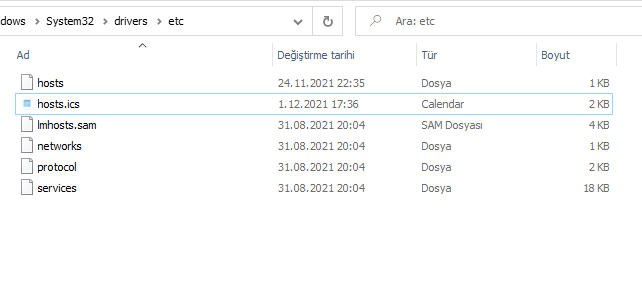
İlk olarak C:\Windows\System32\drivers\etc klasörüne girin.
ENG
In the software of some forums, your host files are changed without your permission, and when you try to enter the sites they see as competitors, they direct them to their domain ip addresses.
And since they also remove the write permission in the file permissions, you cannot interfere with these files, which can be annoying. Let me teach you how to delete these çomar files.
First, enter the C:\Windows\System32\drivers\etc folder.
TR
Gördüğünüz üzere bende 2 adet illet dosya bulunmakta bu dosyaları silemiyorum.
İzinleri aktif olarak oturum açtığım kullanıcıya devrederek veya şu adımları izleyerek silebiliriz.
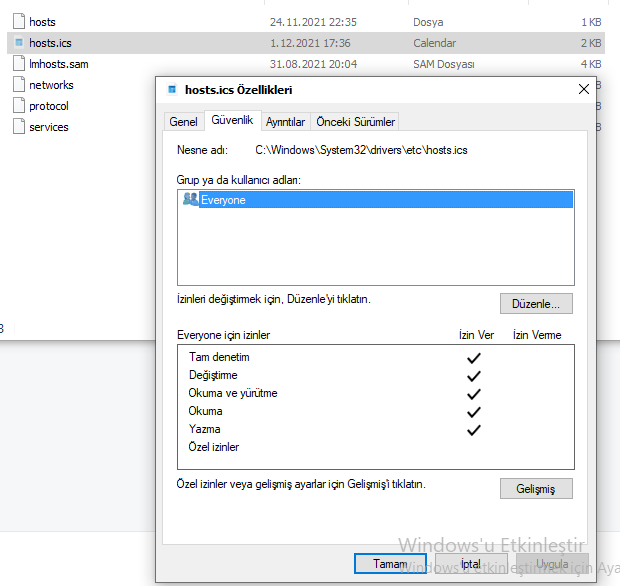
İlk olarak dosyaya sağ tıklayın ve özellikler sekmesini açın.
ENG
As you can see, I have 2 ill files and I cannot delete these files.
We can delete it by transferring permissions to the user I'm actively logged in to or by following these steps.
First, right-click on the file and open the properties tab.
TR
Güvenlik sekmesine gelin ve Düzenle tıklayın.
ENG
Go to the Security tab and click Edit.
TR
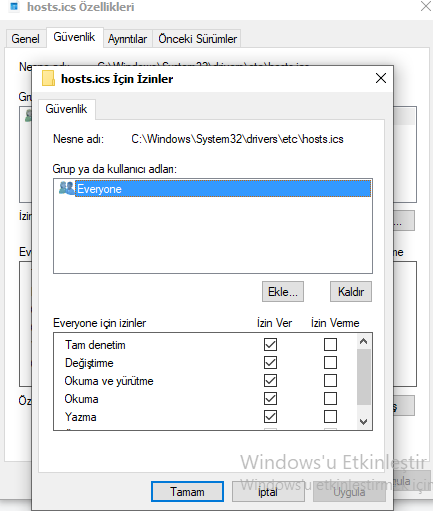
Tam denetimi işaretleyip Uygula Tamam butonlarına tıklayın. Artık işlemlerimiz bu kadar bu dosyaları dilediğiniz gibi si... Kısaca dosyaların üzerinde değişiklik yapabilirsiniz veya silebilirsiniz. İyi forumlar.
ENG
Check full control and click Apply OK buttons. That's all for now, you can save these files as you wish... In short, you can modify or delete the files. Good forums.
Bazı forumların yazılımlarında host dosyalarınız izniniz dışında değiştiriliyor ve kendilerine rakip gördükleri sitelere girmeye çalıştığınızda kendi domain ip adreslerine yönlendiriyorlar.
ve aynı zamanda dosya izinlerinde de yazma iznini kaldırdıkları için bu dosyalara siz müdahale edemiyorsunuz haliyle bu durum can sıkıcı olabiliyor. Gelin sizlere bu çomar dosyalarını nasıl sileceğinizi öğreteyim.
İlk olarak C:\Windows\System32\drivers\etc klasörüne girin.
ENG
In the software of some forums, your host files are changed without your permission, and when you try to enter the sites they see as competitors, they direct them to their domain ip addresses.
And since they also remove the write permission in the file permissions, you cannot interfere with these files, which can be annoying. Let me teach you how to delete these çomar files.
First, enter the C:\Windows\System32\drivers\etc folder.
TR
Gördüğünüz üzere bende 2 adet illet dosya bulunmakta bu dosyaları silemiyorum.
İzinleri aktif olarak oturum açtığım kullanıcıya devrederek veya şu adımları izleyerek silebiliriz.
İlk olarak dosyaya sağ tıklayın ve özellikler sekmesini açın.
ENG
As you can see, I have 2 ill files and I cannot delete these files.
We can delete it by transferring permissions to the user I'm actively logged in to or by following these steps.
First, right-click on the file and open the properties tab.
TR
Güvenlik sekmesine gelin ve Düzenle tıklayın.
ENG
Go to the Security tab and click Edit.
TR
Tam denetimi işaretleyip Uygula Tamam butonlarına tıklayın. Artık işlemlerimiz bu kadar bu dosyaları dilediğiniz gibi si... Kısaca dosyaların üzerinde değişiklik yapabilirsiniz veya silebilirsiniz. İyi forumlar.
ENG
Check full control and click Apply OK buttons. That's all for now, you can save these files as you wish... In short, you can modify or delete the files. Good forums.